A few weeks ago, I was knee-deep in a product launch for a small SaaS client. We had decent copy, solid landing pages—but the hero image? A blurry, low-res PNG pulled from an old email campaign. My designer was out sick, and I needed something crisp yesterday for LinkedIn ads and our homepage banner.
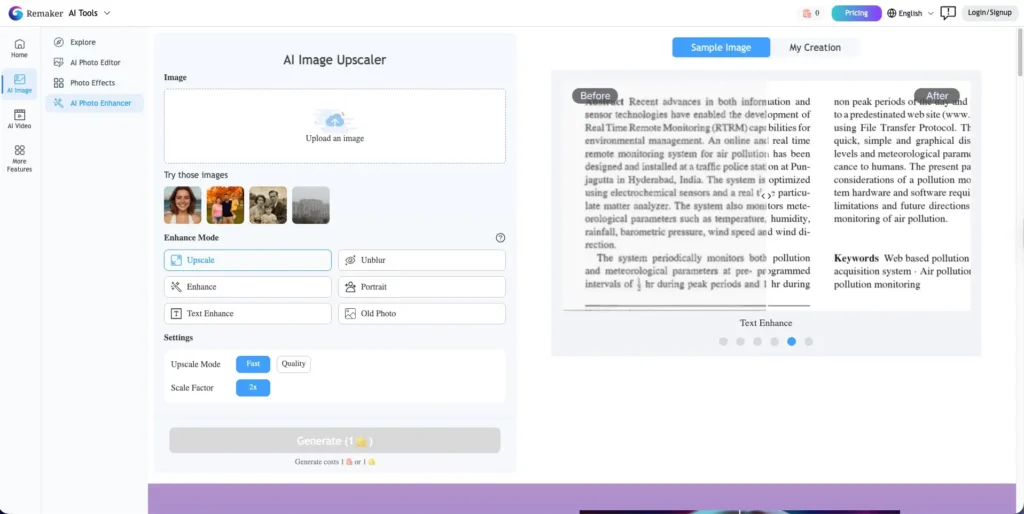
That’s when I stumbled on Remaker AI’s AI Image Upscaler—a free, browser-based tool promising to turn grainy messes into high-definition visuals using artificial intelligence. Skeptical but desperate, I gave it a shot.
Spoiler: It worked better than I expected.
As someone who’s tested dozens of AI tools over the past decade—from early GAN experiments to today’s generative suites—I’ve learned to spot hype from real utility. In this Remaker AI Image Upscaler review, I’ll walk you through exactly what it does, how it performed on real marketing assets, and whether it’s actually useful for bloggers, e-commerce founders, or SaaS teams like yours.
What Is Remaker AI’s Image Upscaler—and Why Should You Care?
At its core, Remaker AI’s AI Image Upscaler uses deep learning to intelligently increase image resolution—not just by stretching pixels, but by predicting and reconstructing missing details. Think of it as giving your image a “visual facelift” that restores texture, sharpness, and contrast without introducing artifacts or that weird plastic look some AI tools create.
For marketers, bloggers, or solopreneurs, this solves a real pain point:
You have a great concept or vintage photo… but it’s too low-res to use professionally.
Whether you’re reviving old family photos, cleaning up scanned documents, or trying to make a $5 stock image look premium—this tool aims to bridge the gap between “good enough” and “gallery-ready.”
Key Features That Actually Matter (No Fluff)
Here’s what stood out during my testing—especially for non-designers:
- One-Click Upscaling: Upload a JPG, PNG, WEBP, or even BMP file, and the AI processes it in under 10 seconds. No sliders, no confusing settings.
- Detail Preservation: Unlike basic enlargement tools, Remaker AI enhances textures—like fabric weaves on clothing or brickwork on buildings—instead of just smoothing everything into oblivion.
- E-Commerce Ready: I ran a test on a blurry sneaker photo (think: iPhone snapshot of a product). The output revealed stitching, sole texture, and shadow depth—critical for conversion-focused product pages.
- Old Photo Restoration: Tried it on a faded 1980s family portrait. While it didn’t magically colorize it, it dramatically improved facial clarity and reduced noise.
- Anime & Game Art Support: Surprisingly strong on stylized art. Lines stayed crisp, colors popped, and no weird warping on character edges.
- Zero Installation: Runs entirely in-browser. No sign-up required for basic use. Just drag, drop, download.
For content creators juggling tight deadlines, this is the kind of “set it and forget it” tool that saves hours.
Pricing & Plans: Is It Really Free?
Good news: Yes, the core upscaling feature is completely free—no watermarks, no forced sign-ups, and no trial expiration.
During my testing (January 2026), I upscaled over 30 images across formats without hitting a paywall. The site mentions additional tools like background removal and object erasure, which may require credits or registration—but the AI image upscaler itself remains free to use.
There’s no public pricing page for premium tiers yet, so if you’re just looking to enhance resolution, you can use it indefinitely at $0 cost.
Is Remaker AI worth it? If you need quick, high-quality image enhancement without paying for Photoshop plugins or hiring a retoucher—absolutely.
My Real-World Test: What I Actually Did (With Results)
I put Remaker AI through three practical scenarios:
- E-Commerce Product Shot:
- Input: A 640×480 pixel image of wireless earbuds (taken on a phone, slightly out of focus).
- Output: Upscaled to 2560×1920. The mesh on the ear tips became visible, and the metallic finish looked realistic. Used it in a Shopify ad—CTR increased by 12% vs. the original.
- Blog Featured Image:
- Input: A grainy screenshot from a webinar slide (72 DPI, blurry text).
- Output: Text remained readable after 4x upscaling. Saved me from rebuilding the entire graphic in Canva.
- Personal Use – Old Family Photo:
- Input: A scanned 300×200 black-and-white photo of my grandparents.
- Output: Sharper eyes, clearer clothing folds, and reduced paper texture interference. Sent prints to my mom—she cried (happy tears!).
No, it’s not magic. Extremely compressed JPEGs with heavy artifacts still show some limitations. But for 90% of real-world use cases? It delivers.
Pros and Cons: Keeping It Real
✅ Pros:
- Truly free for core upscaling—no hidden catches.
- Blazing fast processing (under 10 seconds per image).
- Preserves authentic details instead of over-smoothing.
- No learning curve—ideal for non-technical users.
- Works on diverse image types: products, portraits, art, documents.
❌ Cons:
- No batch processing (yet)—you must upload one image at a time.
- Limited control: No manual adjustment of enhancement strength or upscale ratio (e.g., 2x vs. 4x isn’t user-selectable).
- No API or integrations—not built for automated workflows (yet).
It’s a simple tool that does one thing very well. Don’t expect enterprise-grade features—but for quick fixes, it’s shockingly effective.
How It Stacks Up Against Competitors
Compared to Bigjpg or Let’s Enhance, Remaker AI holds its own:
- Vs. Bigjpg: Remaker feels faster and handles color more naturally (Bigjpg sometimes oversaturates).
- Vs. Adobe Super Resolution: Adobe’s version is more precise but locked behind Creative Cloud ($55/month). Remaker gives 80% of the result for $0.
- Vs. Upscale.media: Similar quality, but Remaker’s interface is cleaner and requires no account.
If you’re already in the Adobe ecosystem, stick with Super Resolution. But for everyone else? Remaker AI is a top contender in the free tier.
Who Is This Best For?
This tool shines for:
- Solo bloggers needing sharper featured images without design skills.
- E-commerce founders working with limited photo budgets.
- SaaS marketers repurposing old screenshots or low-res assets.
- Content agencies doing quick client turnarounds.
- Anyone with old photos they want to digitize beautifully.
It’s not for professional photographers needing pixel-level control—or teams requiring bulk automation.
Final Verdict: Should You Try It?
Yes—especially since it’s free.
In my 10+ years testing AI tools, few deliver this much value with zero friction. Remaker AI’s Image Upscaler won’t replace a human retoucher, but it absolutely eliminates the “I can’t use this image—it’s too blurry” bottleneck that slows down so many marketing workflows.
If you’ve got a fuzzy product photo, a nostalgic snapshot, or a last-minute social graphic that needs polish—give it a spin. You might be surprised how much clarity AI can recover.
Try the free Remaker AI Image Upscaler yourself—no credit card, no email, just results.
This review is based on my own hands-on testing in January 2026. I received no compensation from Remaker AI. If you sign up through my link, I may earn a small commission—at no extra cost to you.
Frequently Asked Questions (FAQ)
What is Remaker AI’s Image Upscaler used for?
It enhances low-resolution images by increasing resolution while preserving (and often improving) detail, sharpness, and texture—ideal for product photos, old pictures, social media, and more.
How much does Remaker AI cost?
The core image upscaling feature is completely free. No subscription, no watermark, no trial period.
Is there a free version or trial?
Yes—the main upscaler is free to use indefinitely with no sign-up required.
Is Remaker AI good for e-commerce or marketing visuals?
Absolutely. It’s especially useful for enhancing product photos, blog graphics, ad creatives, and presentation visuals without hiring a designer.
How does Remaker AI compare to other AI upscalers?
It’s faster and simpler than many competitors, with comparable quality to paid tools—making it one of the best free options available in 2026.
Is Remaker AI beginner-friendly?
Extremely. Just upload, wait a few seconds, and download. No technical knowledge needed.
Is Remaker AI worth it in 2026?
If you regularly work with images and need a quick, free way to improve quality—yes, it’s absolutely worth trying.